03 / 12Gmail
Send the instant reply
Add a Gmail node with the Send operation and connect your Google account. Write the reply so it acknowledges what they actually asked and gives one clear next step.
Speed is the whole point here — a plain, short email sent in sixty seconds outperforms a polished one sent tomorrow.
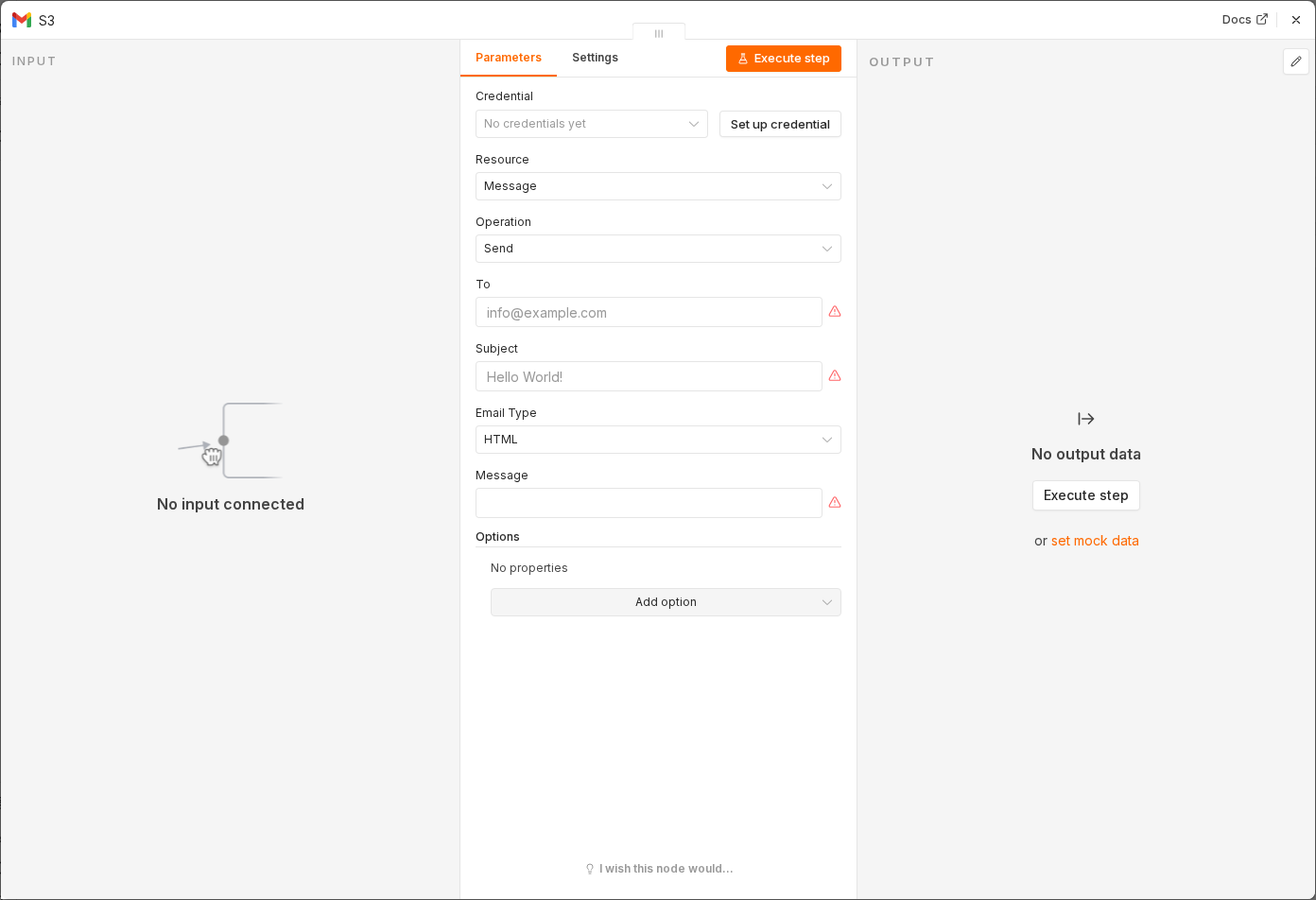 6 things to set here
- 1Open the Gmail node — double-click it on the canvas
- 2To — paste as an expression
- 3Subject — paste as an expression
- 4Message — paste as an expression
- 5Email Type — copy the value below
- 6Check before moving on — Test step sends the email and it arrives looking personal, not templated.
Toexpression
{{ $json.email }}Subjectexpression
Thanks for getting in touch, {{ $json.firstName }}Messageexpression
Hi {{ $json.firstName }},

Thanks for reaching out — I've read your note and I'll come back to you properly today.

If it's easier to talk it through, grab a time here: https://example.com/book

Speak soon,
Your name
Email Type
Text
Watch out
Do not promise something the automation cannot keep. 'I'll come back to you today' only works if you actually will.
Checkpoint
Test step sends the email and it arrives looking personal, not templated.